71% of Staff Use Unapproved AI: Shadow AI Risks IT Leaders Must Fix
13 min readOmniPulse
Shadow AI is the unsanctioned use of AI tools, browser extensions, agents, or embedded features outside your approved systems, and its chief danger is losing control over where sensitive data ends up and how decisions get made. The immediate priority is not a ban. It is visibility: find out what’s already running, because you can’t govern what you can’t see.
TL;DR:
Most shadow AI use occurs through personal accounts, browser extensions, API keys, embedded SaaS features, or locally run models, often without detection.
The main risks include data confidentiality breaches, privacy violations, biased or incorrect output, model manipulation, and autonomous agents escalating privileges.
Discovering shadow AI requires examining endpoints, SaaS integrations, API logs, code repositories, and new service accounts for suspicious activity.
Effective governance relies on inventory, risk-tiered controls, rapid approval processes, and continuous measurement rather than outright bans.
A Business Diagnostic Process can identify hidden AI activities and prioritize fixes, with a focus on visibility and fast action to reduce unmanaged shadow AI.
Table of Contents
-
A practical mitigation programme: govern, map, measure, manage
-
Governance and board accountability: what executives should demand
Shadow AI risks explained: how this differs from shadow IT
Shadow IT meant staff signing up for a rogue project management app or file‑sharing account. Shadow AI is the same instinct, unsanctioned tools solving a real problem, but the mechanics are different enough that your existing shadow IT playbook won’t catch it.
An unapproved SaaS tool usually just stores data somewhere you don’t control. An unapproved AI tool can ingest that data into a model, retain it for training, generate outputs based on flawed reasoning, or act on your systems with a level of autonomy no spreadsheet ever had. The risk categories barely overlap.
The scope of “shadow AI” covers a wide range of unsanctioned activity:
-
Personal ChatGPT, Claude, or Gemini accounts used to draft contracts, summarise customer data, or debug proprietary code.
-
Browser extensions and AI meeting notetakers that silently capture and transmit whatever appears on screen or in a call.
-
API keys and embedded AI features inside CRM, HR, or productivity platforms that nobody in security signed off.
-
Autonomous agents given broad permissions to complete tasks, often with far more system access than the job requires.
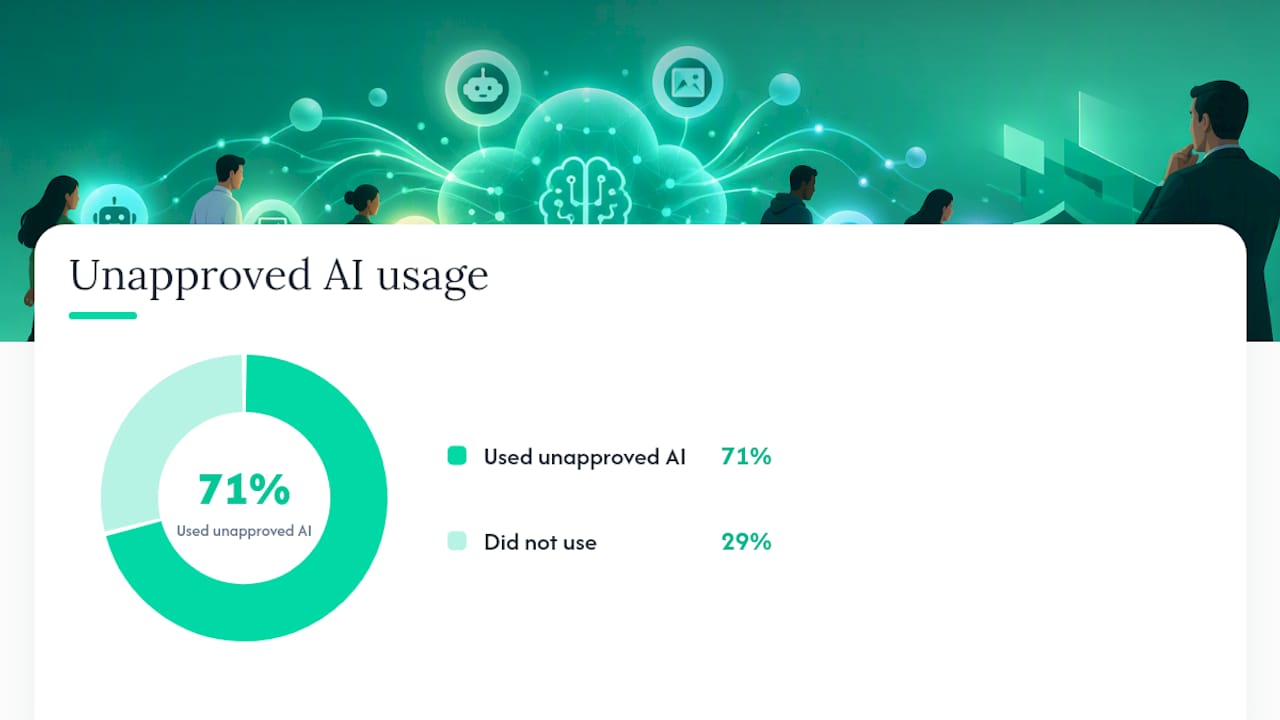
The scale of the problem is already large. One study cited by the National Cyber Security Centre found that 71% of employees had used AI tools their employer hadn’t approved. That’s not a fringe behaviour problem. It’s the default state of most mid‑sized organisations right now, whether leadership knows it or not.
The core difference to keep in front of your board: shadow IT risked data sitting in the wrong place. Shadow AI risks data leaving your control permanently, decisions being made on hallucinated or biased outputs, and systems acting with a level of independence that traditional access controls were never designed to constrain.
How shadow AI happens: common vectors and examples
Shadow AI rarely arrives through a dramatic breach. It creeps in through convenience, one login at a time. Here’s where it actually starts:
-
Personal consumer accounts. An employee pastes a client brief into a free AI account on their phone because the sanctioned tool is slow or locked down. No IT ticket, no record, no way to know what was uploaded.
-
Browser extensions and meeting notetakers. A sales rep installs a free AI notetaker that joins every call and quietly stores transcripts, including pricing discussions and personal information, on a third‑party server.
-
API keys and developer tooling. A developer wires an AI API into an internal tool over a weekend to solve a genuine bottleneck, using their own key, with no logging and no review of what data flows through it.
-
Embedded SaaS AI features. Your CRM, help desk, or HR platform quietly ships a new AI summarisation feature, switched on by default, that nobody in security ever evaluated. This is one of the hardest categories to inventory precisely because it doesn’t look like a new app. It’s a feature flag inside software you already use, creating a data path without a traditional install.
-
Locally run models and agentic workflows. A technical team downloads an open‑weight model to run locally, or builds an autonomous agent with file, email, and system access to save time on repetitive work, often granting it more privilege than the task strictly needs.
Each of these examples maps to a different detection point, which matters enormously when you’re deciding where to look first.
Primary risks of shadow AI: what actually goes wrong
Unregulated AI use creates harm across four distinct categories, and treating them as one blob makes it harder to prioritise a response. Break it down by what’s actually threatened.
Confidentiality risk is the most immediate. Once someone pastes client data, source code, or financial figures into a commercial AI tool, that information may be retained, used for model training, or handled by the provider in ways your organisation never agreed to. The Office of the Australian Information Commissioner has warned that inputting personal information into commercial generative AI tools can be difficult to reverse, and organisations should assess retention settings, training exposure, and provider handling before adoption, not after an employee has already uploaded something. A separate OAIC blog post makes the point even more bluntly: once personal information enters a generative AI system, it can be impossible to track or remove.
Shadow AI by the numbers: 71% of employees in the study cited by the NCSC had used an AI tool their employer hadn’t approved. That figure alone should reframe shadow AI as a governance gap you already have, not a hypothetical risk you’re planning against.
Privacy and regulatory exposure compounds the confidentiality problem. Under Australian privacy obligations, your organisation remains accountable for how personal information is handled, even when a third‑party AI vendor is the one processing it. The OAIC’s guidance is explicit that responsibility doesn’t transfer just because the tool sits outside your infrastructure.
Integrity risk covers a different failure mode entirely: AI systems that are wrong with total confidence. Hallucinated facts, biased outputs, and confidently incorrect summaries feeding into real business decisions, contracts, hiring calls, financial forecasts, cause damage that’s often invisible until much later.
Supply chain and model risks include data poisoning, model theft, and third‑party retention practices you have no visibility into. NIST’s guidance on adversarial machine learning treats poisoning and model‑stealing as genuine threats to both integrity and intellectual property, not theoretical edge cases.
Agentic risk is the newest and least understood category. An autonomous agent with broad system permissions can escalate its own privileges, take actions no human reviewed, or trigger cascading failures across connected systems. This is where operational, reputational, and financial damage can compound fastest, because the failure isn’t a single bad output. It’s a chain of automated decisions nobody was watching.
Discovering and inventorying shadow AI use
You cannot govern activity you cannot see, so discovery has to come before policy. Start by looking in the places shadow AI actually lives, not where your existing asset register assumes it lives.
Focus your search on:
-
Endpoints and browser sessions, where extensions and personal AI accounts leave traces in browsing history and installed add‑ons.
-
SaaS integrations and OAuth grants, where employees have connected a personal account to corporate data without a formal review.
-
API and network logs, where unexpected outbound traffic to AI provider domains signals unsanctioned use.
-
Code repositories, where developers may have embedded API keys directly into scripts or internal tools.
-
New service accounts, which often indicate an agent or automation was set up outside normal provisioning.
Watch for specific signals: unusual upload volumes to unfamiliar domains, spikes in API calls tied to a single user or team, OAuth grants nobody in IT approved, and new service accounts with permissions broader than their stated purpose. OAIC guidance flags embedded features and service connections as the hardest category to inventory, precisely because they don’t announce themselves as new software.
For tooling, extend your data loss prevention rules to flag AI‑specific upload patterns, run proxy and log analysis against known AI provider domains, and use identity analytics to catch anomalous OAuth activity before it becomes routine.
Once you’ve found something, rank it fast rather than debating it for weeks. A workable shortcut: score each discovered tool against data sensitivity (what’s being uploaded), autonomy (can it act without a human checking first), external connectivity (does it touch systems beyond itself), and business impact (what breaks if it goes wrong). Anything scoring high on two or more dimensions goes to the top of your remediation queue.
Pro Tip: Don’t wait for a full inventory before acting. Triage the five riskiest tools you already know about this week, then build the complete picture in parallel. Perfect visibility six months from now is worse than partial control today.
A practical mitigation programme: govern, map, measure, manage
-
Inventory and classify. Catalogue every AI tool in use, sanctioned or not, and sort each by risk tier based on data sensitivity and autonomy.
-
Define boundaries and approved tooling. Set clear rules on what data can and can’t be entered into any AI system, then run vendor due diligence, checking retention policies, training settings, and data handling, before adding a tool to the approved list.
-
Enforce technical controls. Layer in data loss prevention rules tuned for AI uploads, lock down retention and training settings wherever the vendor allows it, and apply identity controls built on least privilege. ASD guidance on agentic AI specifically recommends dynamic entitlements and repeated permission checks at invocation time, not just a one‑off approval when an agent is first deployed.
-
Build operational rules that don’t slow people down. Set up a rapid review process so a new tool request gets an answer in days, not months. Offer developer sandboxes for experimentation with synthetic data, and run practical training so staff know what’s safe to paste into any AI system.
-
Measure and iterate. Track telemetry on AI usage, incident counts tied to AI tools, and approval turnaround times. NIST’s generative AI risk profile frames this as lifecycle risk management rather than a one‑time policy exercise, and that framing holds up in practice: controls need to evolve as new agentic capabilities appear.
Pro Tip: Measure how fast your approval process runs, not just how many tools you’ve blocked. If it takes six weeks to approve a low‑risk tool, you’ve just manufactured your next shadow AI incident.
AI-specific incident response: what to capture
Standard incident response playbooks miss the artefacts that actually matter in an AI incident. If your team can’t answer “what did the model see and what did it output,” you can’t determine what data left the building or how a decision got made.
Capture these specifically:
-
Prompts and outputs from the session in question, not just system logs.
-
Model and tool versions in use at the time.
-
Retention and training settings configured for that tool.
-
OAuth tokens, API keys, and agent action logs tied to the incident.
NIST’s generative AI profile is explicit that without these artefacts, investigators cannot reconstruct what data was exposed or how an output influenced a downstream decision. Containment means revoking the relevant keys and tokens immediately, isolating any agent accounts involved, and preserving backups before anything gets overwritten.
Once containment is done, check whether personal information left the organisation and whether that triggers a notification obligation under your privacy requirements. Feed everything you learn back into your inventory and controls: an incident that doesn’t update your risk register was a wasted incident.
Governance and board accountability: what executives should demand
Shadow AI risk needs a named owner, not a shared assumption that someone else is handling it. That’s usually a CISO or CIO working alongside individual business unit leaders who understand what their teams actually need AI to do.
Boards should expect to see AI use cases tiered by risk appetite, not treated as a single uniform category. Demand concrete artefacts: an approved tool list, privacy impact assessments for anything touching personal data, and incident metrics that get reported on a fixed cadence, not just when something goes wrong.
The outcome metrics that matter aren’t compliance checkboxes. Ask for visibility coverage (what percentage of AI use is actually known), the volume of risky uploads blocked, and how long tool approvals take. If approval times are creeping up, shadow use is creeping up right alongside them.
How OmniPulse helps you find and fix hidden AI risk
Most shadow AI problems aren’t a policy failure. They’re a visibility failure, teams solved a real problem the fastest way available, and nobody mapped the consequence. A Business Diagnostic Process can find exactly this kind of gap: where AI is touching data, workflows, and decisions inside a mid‑sized business, sanctioned or not, and what that’s actually costing or risking.
The diagnostic can prioritise findings by value and feasibility, then convert them into a step‑by‑step roadmap rather than a generic best‑practice document. This process may be backed with a results guarantee, continuing at no additional cost until sufficient opportunity is surfaced, to keep the incentive aligned with finding the problem rather than filling billable hours. If your organisation suspects shadow AI is already running unmanaged, a readiness session is the fastest way to find out what’s really there.
Why bans fail and useful tools win
Most organisations respond to shadow AI risk by writing a policy that says no. It doesn’t work, and it never really has. Staff route around blocked tools the same way they always did with shadow IT, except now the workaround might be pasting client data into a personal account on a phone that IT will never see.
The uncomfortable truth is that shadow AI is usually a signal, not a behavioural failure. People are telling you, through their actions, exactly what capability they need and don’t have. Ignore that signal and you get more shadow use, not less. Treat it as a product requirement and you get a faster path to actual control.
What I’d push back on hardest is the instinct to lead with restriction. Lead with speed instead: make the approved tool genuinely faster to use than the workaround, and most of the shadow use disappears on its own. Then measure whether risky behaviour is actually dropping, not whether you’ve published enough policy documents. The controls that matter now, identity, least privilege, monitoring, will need to keep changing as agentic tools get more autonomous. Build for that assumption from day one.
Brodie S
Book a readiness session with Omnipulseai
If this article has you wondering how much AI activity is already running unmanaged in your business, that question can be addressed by a strategy engagement built to map where AI use, sanctioned or shadow, is touching your data, workflows, and revenue, then prioritise the fixes that matter most.
The engagement is a fixed strategy engagement priced at $15,000, and it comes with a guarantee: if the diagnostic doesn’t uncover sufficient hidden opportunity, Omnipulse keeps working at no extra cost until it does. That’s a different incentive structure to a consultant billing by the hour for generic recommendations. If you’d rather start smaller, book a 30‑minute AI readiness session and find out where your organisation actually stands before committing to anything larger.
Sources
FAQ
What Is Shadow AI and How Common Is It?
Shadow AI is any AI tool, extension, agent, or embedded feature used inside an organisation without formal approval or oversight. It’s already widespread: one study cited by the NCSC found 71% of employees had used an unapproved AI tool, meaning most organisations already have it running whether they’ve mapped it or not.
What Are the Main Risks of Unregulated AI Use?
The core risks fall into four buckets: confidentiality (data uploaded to tools with unclear retention practices), privacy and regulatory exposure under obligations like the Privacy Act, integrity (hallucinated or biased outputs feeding real decisions), and agentic risk (autonomous tools escalating privileges or acting without review). The OAIC has specifically warned that personal information entered into generative AI can be difficult to reverse, which makes prevention far cheaper than remediation.
How Do You Avoid Shadow AI Without Banning Tools Outright?
Outright bans tend to fail because staff route around them, often onto personal devices with zero visibility. A better approach pairs enforceable data boundaries with fast, genuinely useful approved alternatives and a quick approval process, an approach the NCSC recommends over blanket restrictions. Discovery and inventory come first, then risk tiering, then controls.
Which Jobs or Tasks Are Most Exposed to AI-Related Risk?
Roles that handle sensitive client data, legal drafting, financial analysis, or customer communications carry the highest exposure, because a hallucinated fact or a leaked upload in those functions causes disproportionate damage. The risk isn’t that a role disappears; it’s that unmanaged AI use in that role creates liability nobody signed off on.
How Can Omnipulse Help With Shadow AI Governance?
Omnipulse runs a Business Diagnostic Process that identifies where AI use, sanctioned or shadow, is already touching data and workflows, then builds a prioritised, step‑by‑step roadmap to address it. The engagement is priced at $15,000 with a results guarantee, and readers can start with a shorter readiness session to assess where they currently stand.